
|
Build Automator Documentation
Select Variable |
|
Previous
Top
Next
|
|
|
In the actions provided by the author of the Build Automator™, Icetips Alta LLC, you can select variables into most entries on the Action windows. To select a variable hold down the Control Key (CTRL) and clicking with the right mouse button. Alternatively place the cursor where you want the variable to appear and press the down arrow key on the keyboard. If you want to close the window without selecting a variable, press the Esc key on the keyboard or click the red close button in the top right corner of the window.
The Build Automator™ supports two kinds of variables, Project Variables and System Variables:
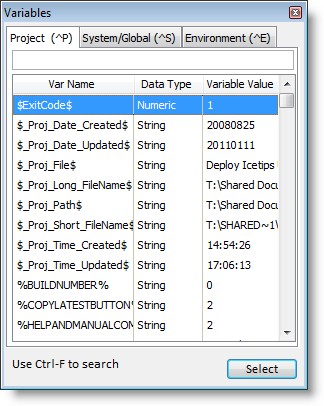
The Project Variables are related to the project and you can add new variables to the list, delete or change them. Please check the Project Variables topic for more information about how to create variables. In the beta version you cannot create variables from this variable select window. Variables that you create can have different data types, String, Decimal, Numeric, Date or Time. The data is always stored as strings (i.e. as plain text) but the data type defines how the data is formatted. In the beta the formatting is hard coded but user defined formatting is being tested.
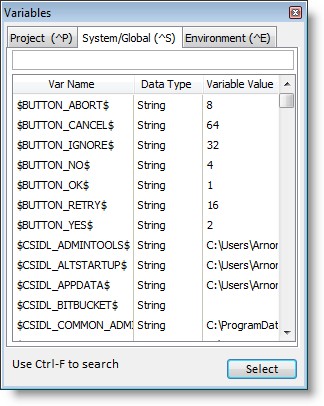
The other type of variables are the System Variables. These are variables that the system updates automatically. In the start of the beta we have all the CSIDL paths as well as the current date and time. As we add more System Variables we may need to group them together to make them easier to select. We will also provide a search locator.
Note that the Variables window is resizable and will remember it's size and location next time you open it to make it more convenient for you to select.
Version 1.30.150: Please note that this window is now available in the BASupport.DLL that is located in the "C:\Program Files\Common Files\Icetips Creative\Build Automator\Plugins" folder. Documentation of this toolkit dll is currently under construction.