www.buildautomator.com  Build Automator Documentation

Automator Options

Previous  Top  Next  


The Build Automator™ can be customized to serve your needs.  We will be adding more new options during the lifetime of the 2008 Edition, so the window you open may look slightly different from the screenshots, although the documentation will keep as much up to date with the software as possible.
 

Automator_Options_Folders

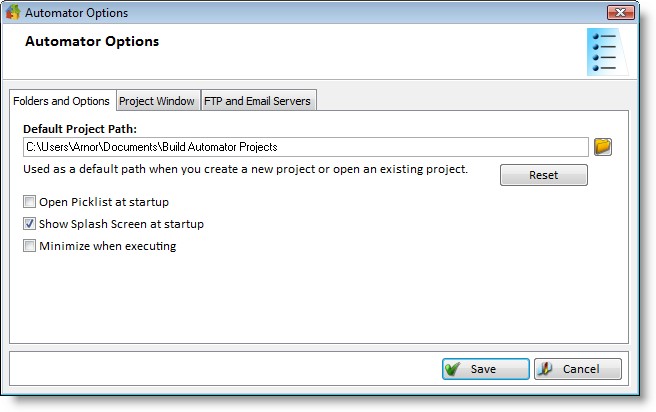
On the first tab you can specify the default project path.  This path is used when you create or open a file as the default path.  It defaults to your "My Documents\Build Automator™ Projects" folder, but you can change it to any folder.  To set your default path back to the default "My Documents" folder, click on the Reset button.  You will be prompted for a confirmation to reset it.


You can check or uncheck if you want to open the picklist at startup or not.  You can also check or uncheck if you want to see the splash screen at startup.
 

Automator_Options_Project_Window


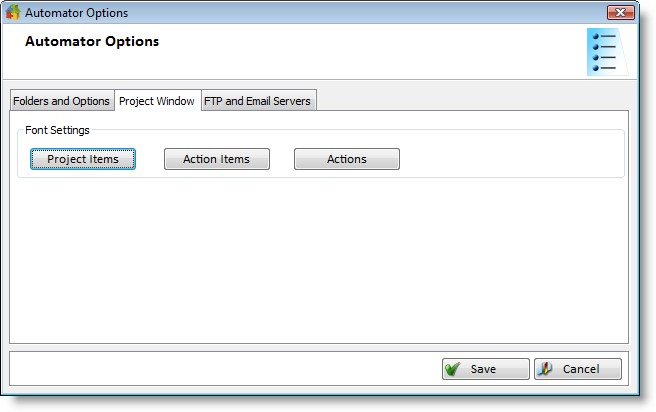
The "Project Window" tab is still under construction but you can now select the font to use for the Project Items, Action items and Actions lists on the Project Window. 


Automator_Options_Editor_and_Code_gen

The Build Automator™ does not have a built-in XML editor.  You can select an editor to use to open and edit the Vendor Action files. 


The Build Automator™ can generate code in 3 different languages for you to get started with the plugin dll.  If the destination path for a selected language has not been selected, the generation will not take place.  If you are running the Build Automator™ on Vista or Windows 2008 make sure that the software has write access in the destination folder.  Do not select the program path as a destination folder.  The filename of the generated source file is the same as the Action File (.actn)  The languages currently available are:


ClarionCode generation is either in the form of a .CLW source file, or a .TXA file.  The .TXA file generates all functions necessary in the DLL and provides a quick way to start creating new plugins. 
Visual C++Code generation is in the form of a .h header file and a .cpp source file.  .vcproj is not generated in Beta 1.
DelphiCode generation is in the form of a .dpr file.  .dproj is not generated in Beta 1.


Automator_Options_MSBuild_Options

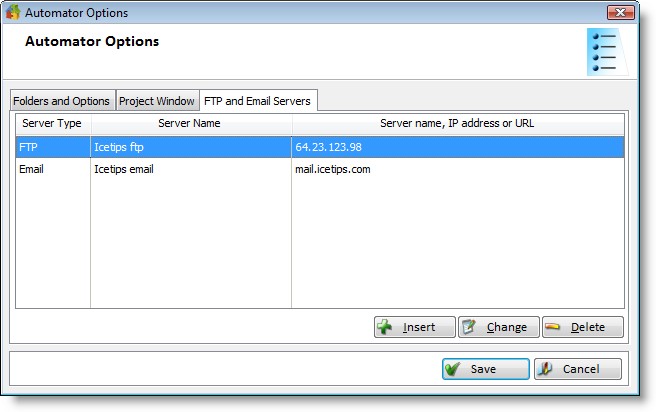
The third tab shows the default project files and solutions that are available for compiling with MSBuild.  The Build Automator™ does not support direct calls to the individual compilers, but rather goes through MSBuild to compile the project or solution.  Currently you can not edit this list.


Direct link to this page: http://www.buildautomator.com/onlinemanual/automatoroptions.htm